Posted in Instagram Buzz

How to Get Music Sticker on Instagram Story

Video in Hindi (English Sub)
Video in English (English Sub)

Its been a while since Instagram Introduced the music stickers to stories, the music stickers are part of Instagram App since version 51 updates, but for now, the feather is available only for this seven countries: Australia, New Zealand, France, Germany, Sweden, UK, and the US.

If you have friends in these countries, you might be seeing this notification in there stories “Instagram music isn’t available in your region”.
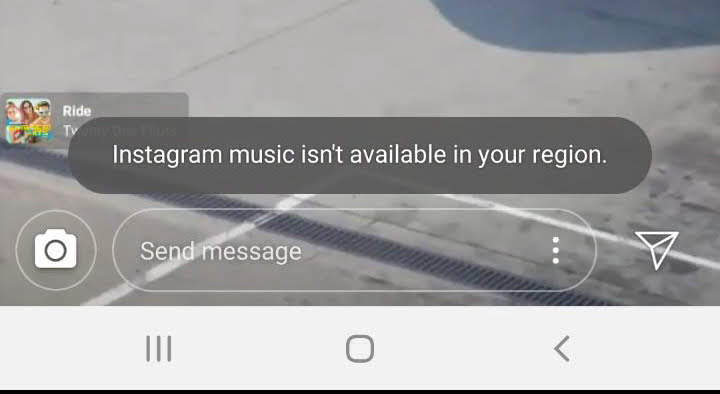
psx_20190422_173642
This is because Instagram needs a license to play music due to copyright infringement or piracy issues. In the regions where the feature is still not available, there are a number of legal procedures that have to be taken care of by Instagram as there is no global law for copyright and piracy. It may take some time for the feature to be available on a global scale.

So the question now is, can you use this feature if it’s not available in your region. The answer is off course you can use it as this fetcher is part of the App after the version 51 update. You just need to download a VPN app in your mobile device and you can choose a server from those countries. Problem Solved.

Posted in WordPress Buzz

How to write a back dated post in WordPress

Steps

  • Write a new post or go to any post that you would like to back date.
  • On the right side of your screen below the Publish button you will see “Document” click there.
  • Here you can see publish marked as “immediately” , click there and calendar will pop up.
  • Select your desired post date & click OK.
  • Click publish.

And you are done.

Posted in WordPress Buzz

How to Mute Individual Tabs in Google Chrome

If you are using Google Chrome version 71 and above than
chrome://flags/#enable-tab-audio-muting will not work.

Alternatively to get the tab muting feature to work on google chrome you need to add “Mute Tab” Extension from chrome web store. Find the link below.

https://chrome.google.com/webstore/detail/mute-tab/blljobffcekcbopmkgfhpcjmbfnelkfg/related?hl=en

Create Amazon Business Account
Posted in WordPress Buzz

How to Add Search Bar to WordPress Blog

Steps

  1. Go to your WordPress page
  2. Left top corner of your screen click on “My sites”
  3. On the slide bar at the bottom look for “WP Admin” and click there.
  4. Hover your mouse over “Appearance” and click on “Widgets”
  5. The top right corner of the page find “Enable accessibility mode” and click there.
  6. Scroll down and look for “Search” click Add next to it.
  7. Give a name to your widget and choose a position for search bar, then click “Save Widget”

And you are done.

How To block or unblock someone in Facebook

How To block or unblock someone in Facebook in your Android device

  • Open Facebook app
  • Tap on the menu button in the upper right corner of your screen.
  • Scroll down and tap on the “Settings & Privacy” option.
  • Find and tap on the “Settings” option.
  • Find and tap on the “Blocking” option.

Blocking

  • Tap on Add to blocked list and search for a contact
  • Tap on the contact to add in the block-list.

Unblocking

  • Tap on a contact you want to unblock.
  • Tap unblock.

Check out this popular YouTube Videos

Posted in Instagram Buzz

How To Fix Instagram Will Auto Post When Possible Error

Steps

Note- You have to login again to Instagram as we will be doing a reset to Instagram app.

  1. Long press on Instagram app in your screen
  2. On the Pop-up menu choose Instagram App Info option.
  3. On the App Info page look for storage and tap there.
  4. Look for clear cache and Tab there.
  5. Look for clear data and Tab there.
  6. Go back to Instagram and login
  7. You can post to your feed now